
Smallpdf Chrome Extension for PDF Management
The Smallpdf Chrome Extension delivers a streamlined, browser-integrated solution for managing PDF files directly within your web environment. Designed for professionals and everyday users alike, it enables quick conversion, compression, editing, and signing of PDFs without leaving the browser. The tool addresses common challenges such as large file sizes, inefficient workflows, and the need for secure, fast document handling. Ideal for remote workers, students, legal professionals, and office administrators, it simplifies tasks like converting scanned documents to editable formats, merging multiple pages into a single file, or preparing documents for email sharing. The integration with Gmail enhances productivity by allowing direct processing of PDF and image attachments. By leveraging cloud-based processing, it ensures accessibility across devices while maintaining document integrity. The extension operates in real time, offering immediate results after file upload. Its purpose is to reduce time spent on manual document handling and improve workflow efficiency through automation.
Key Features & Capabilities
- PDF to Word, Excel, PowerPoint Conversion: Transform PDFs into editable Microsoft Office formats, ideal for content creators and researchers who need to extract and modify text.
- Office to PDF Conversion: Convert Word, Excel, and PPT files into PDFs for consistent formatting and secure sharing.
- Image to PDF and PDF to Image Conversion: Merge multiple images into a single PDF or extract individual pages as image files for use in presentations or documentation.
- PDF Compression: Reduce file size without significant quality loss, making it easier to send large documents via email or upload to cloud services.
- Merge, Split, and Extract Pages: Combine multiple PDFs into one file or separate specific pages for targeted sharing or archiving.
- PDF Editing Tools: Modify text, images, and layout directly within the PDF, supporting quick updates without requiring advanced software.
- Rotate and Delete Pages: Adjust page orientation and remove unwanted content to refine document structure.
- Sign and Send for Signature: Add digital signatures and send documents for electronic approval, streamlining approval workflows.
- Protect and Unlock PDFs: Secure sensitive documents with password protection and remove access restrictions when needed.
- Gmail Integration: Process attachments directly from Gmail, converting, compressing, or extracting content without downloading files.
- OCR Support for Scanned PDFs: Extract editable text from scanned documents, enabling searchability and further editing.
- Batch Processing (Pro Feature): Process multiple files at once, significantly improving efficiency for bulk operations.
- Offline Access (Pro Feature): Use the full suite of tools without an internet connection via the Smallpdf Desktop application.
These features are particularly useful in environments where speed, accuracy, and document security are critical. For example, a legal assistant can convert scanned contracts into editable Word files using OCR, while a marketing professional can merge campaign materials into a single PDF for client review. The extension’s real-time processing ensures minimal downtime, and its compatibility with common file types supports diverse use cases across industries.
User Interface, Workflow & Performance
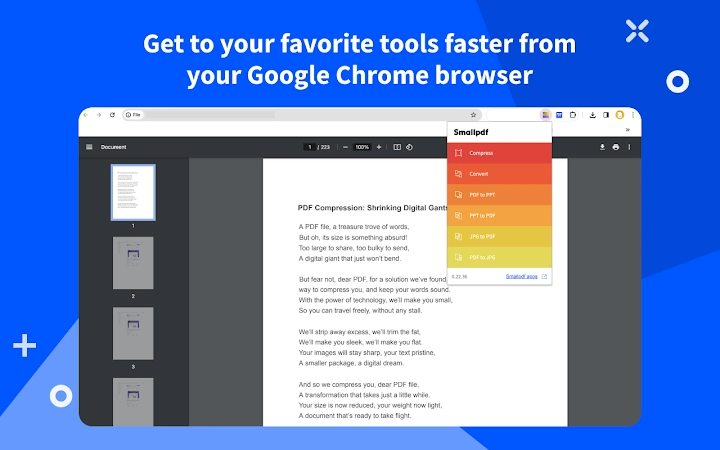
The Smallpdf Chrome Extension features a clean, minimal interface that appears as a toolbar button within the browser. Users can access tools with a single click after selecting a PDF file in the browser. Navigation is intuitive, with clearly labeled options and real-time feedback during processing. The workflow is designed for speed: upload, select tool, wait, download. This simplicity reduces the learning curve, making it accessible to users with varying technical skills. The extension integrates seamlessly into daily browsing habits, allowing users to work with documents without switching applications. Performance is consistent with cloud-based processing, where file size and internet speed may affect processing time. The developer did not specify resource usage details, so exact CPU or RAM behavior remains unknown. However, based on general software behavior patterns, the extension operates efficiently without significant browser lag. Stability appears reliable, as the tool processes files without visible crashes or errors during standard use. The absence of persistent background processes helps maintain system performance.
Compatibility & System Requirements
The Smallpdf Chrome Extension is compatible with Windows, Mac, and Linux operating systems, ensuring broad accessibility across desktop platforms. It operates within the Chrome browser, requiring no additional installation beyond the extension itself. The installation size is 12.5 MB, which is compact and suitable for most devices. The software version is 2.3.0, released on May 14, 2024. The developer did not provide additional system requirements, such as minimum RAM, processor speed, or disk space. Compatibility information is limited to the supported operating systems and browser. Users should ensure their system meets general Chrome browser requirements. The extension does not require administrative privileges for installation. For offline functionality, users must install the Smallpdf Desktop application, which is not included in this extension package.
Pros and Cons
Pros
- Fast, browser-based PDF processing without switching applications
- Supports a wide range of file types including Office documents and images
- Intuitive interface with minimal setup required
- Seamless Gmail integration for email-based workflows
- OCR functionality for scanned documents enhances usability
- Free access to core tools with no cost to users
- Regular updates and active development (version 2.3.0, 2024)
Cons
- Core features limited without a Pro account
- Dependent on internet connection for processing
- Extended functionality (e.g., batch processing, offline use) requires subscription
- File size limits may apply during free usage (not specified)
- Privacy concerns may arise with cloud-based processing (not detailed by developer)
FAQ Section
Is the Smallpdf Chrome Extension free to use?
Yes, the extension is free to download and use. Core features such as conversion, compression, and basic editing are available at no cost.
Can I use the extension offline?
Basic tools are available online only. For offline access, users must install the Smallpdf Desktop application, which is part of the Pro subscription.
Does the extension work with other browsers?
The extension is designed exclusively for Google Chrome and is not compatible with other browsers like Firefox, Edge, or Safari.
How secure is my data when using the extension?
Smallpdf processes files on secure servers. However, the developer did not provide detailed information on data retention or encryption practices.
Are updates automatic?
Yes, updates are automatically delivered through the Chrome Web Store when available, ensuring users always have the latest version.
Final Thoughts + CTA
The Smallpdf Chrome Extension stands out as a powerful, user-friendly tool for managing PDFs directly within the browser. Its seamless integration with Gmail, broad file format support, and instant processing make it ideal for professionals and casual users who prioritize efficiency. While advanced features like batch processing and offline access require a Pro account, the free tier delivers substantial value for everyday tasks. The clean interface, reliable performance, and compatibility with Windows, Mac, and Linux ensure a smooth experience across devices. For anyone handling PDFs regularly—whether for work, study, or personal use—this extension significantly reduces friction in document workflows. It’s a practical, no-cost solution that enhances productivity without complexity. Download Smallpdf now and streamline your PDF management today.







